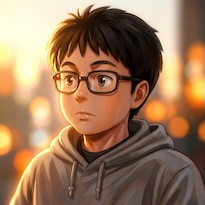
Last tested: February 2026 | Reference images generated on Nano Banana Pro | Videos generated on Dreamina with Seedance 2.0
If you've tried uploading a photo of your face to Seedance 2.0, you've seen the error. ByteDance's content policy blocks real human face uploads as reference images. The guardrails are strict, and there's no toggle to turn them off.
People are frustrated. "Guardrails insanely strict." "Blocked ALL face uploads." "How do I create a reference image using my face?" These are real questions from real creators, posted in the last 48 hours.
The workaround is simple: generate an AI portrait instead of uploading a real photo.
Seedance 2.0 blocks real face photos but accepts AI-generated portraits as reference images. Generate a character portrait on any AI image tool, upload it as your reference, and Seedance will maintain that character's face and appearance across every camera angle in your video.
Here's the proof.
Example 1: Realistic Character (8 Shots, 1 Reference)
One AI-generated reference portrait. One prompt. Seedance 2.0 produced 8 distinct shots with the same character, including close-ups, wide shots, and an emotional arc.
The reference image (generated on Nano Banana Pro):
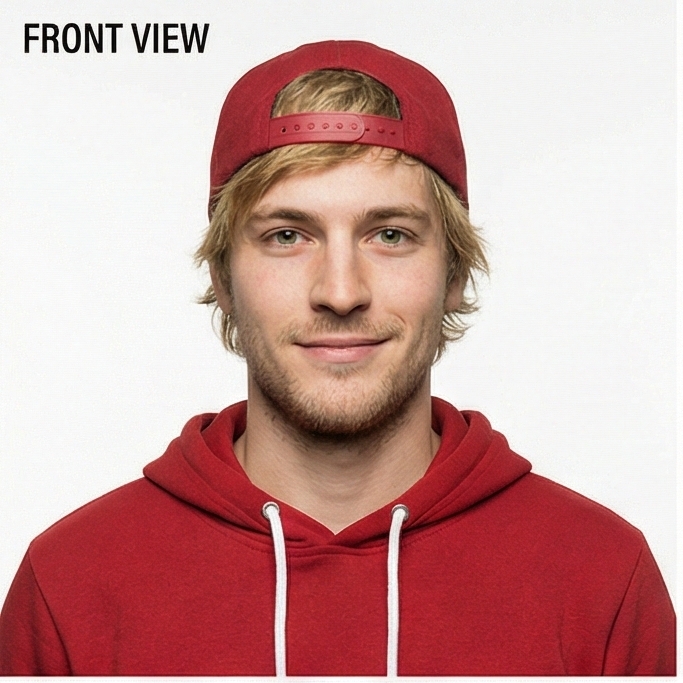
The result:
Prompt used:
A man (@Image 1) walks tiredly down a corridor after work, steps slowing, finally stops at his front door. Face close-up: the man takes a deep breath, adjusts his emotions, puts away negative feelings, becomes relaxed. Then close-up of him searching for keys, inserting into the lock. After entering the home, his little daughter and a pet dog run over joyfully to greet and hug him. The interior is very warm and cozy. Natural dialogue throughout.
Watch what Seedance does with this single reference image:
- 0-2s — Wide corridor shot. Character walks toward camera, tired body language.
- 2-5s — Close-up face. Expression shifts from exhausted to composed to a smile.
- 5-6s — Hands close-up. Keys pulled from pocket (correct red hoodie sleeve from the reference).
- 6-8s — Lock close-up. Key inserts into deadbolt.
- 8-15s — Interior wide. Door opens, daughter runs to hug, dog appears. Emotional payoff.
That's 6 different camera angles, all from one front-view portrait. The face stays consistent. The clothing stays consistent. Even the emotional transitions read clearly across shots.
Example 2: Stylized Character with Motion Transfer
This example goes further. Instead of just a reference image, we gave Seedance a reference image AND a reference video. The image controls who the character is. The video controls how they move.
Side-by-side comparison (reference dance on the left, Seedance output on the right):
Prompt used:
Using @Image 1's female star as the main subject, reference @Video 1's camera movement style for rhythmic push, pull, pan, and tilt movements. The female star's dance moves also reference the woman's choreography in @Video 1, performing energetically on stage.
The @Image 1 tag points to an AI-generated character portrait (created on Nano Banana Pro). The @Video 1 tag points to a downloaded dance clip. Seedance transfers the choreography onto the AI character while keeping her face and outfit consistent.
How to Do It (Step by Step)
Step 1: Generate your character portrait
Use any AI image generator to create a front-view portrait of your character. You need one clear image showing the face, hair, and upper body.
On VicSee, you can use:
- Nano Banana Pro — photorealistic portraits, up to 4K resolution
- FLUX 2 — flexible styles, strong face detail
Prompt tip: Describe the person you want, then add "front-view portrait, neutral expression, studio lighting, clean background." This gives Seedance the clearest reference to work with.
Step 2: Upload as a reference image
On Dreamina (or any Seedance 2.0 platform), upload your AI-generated portrait as a reference image. In the prompt, use @Image 1 to tell Seedance which reference controls the character's appearance.
Step 3: Write your video prompt
Describe the scene you want. The prompt should focus on action, camera movement, and environment. Seedance handles the character's appearance from the reference image.
Prompt structure that works:
[Character] (@Image 1) [does action] in [environment]. [Camera movement]. [Emotional beat or detail].
Step 4: Generate
Standard settings: 1080p, 5-10 seconds, with audio. Seedance will maintain your character's face across every shot in the video.
Tips from 50+ Generations
-
One front-view portrait is enough. You don't need multiple angles. Seedance extrapolates side profiles, three-quarter views, and close-ups from a single front-facing reference.
-
Describe shots in sequence. Instead of "a man comes home from work," describe each beat: corridor shot, face close-up, hands on keys, door opens, family greets. Seedance follows the sequence and generates distinct shots for each beat.
-
Clothing carries over. Whatever your character wears in the reference image, they'll wear in the video. If you want a costume change, you'll need a separate generation with a different reference.
-
Multiple references for complex scenes. Seedance 2.0 supports up to 9 reference images. Use
@Image 1for character,@Image 2for environment,@Video 1for motion. Each reference controls a different aspect of the output. -
Stylized characters work too. The reference doesn't have to be photorealistic. 3D animated characters, anime portraits, and illustrated faces all work as references.
Frequently Asked Questions
Why does Seedance 2.0 block face uploads?
ByteDance's content policy prevents uploading real human face photos to prevent deepfakes and unauthorized use of someone's likeness. This applies to Dreamina (Jimeng) and any platform running the Seedance 2.0 model.
Does the AI portrait workaround violate the content policy?
No. The policy blocks real face photos, not AI-generated portraits. When you generate a character portrait with an AI image tool, it's a new creation, not a photo of a real person. Seedance accepts these as reference images.
How do I keep character consistency across multiple videos?
Use the same reference image for every generation. Seedance maintains the character's appearance from the reference. One front-view portrait is enough for consistent results across different scenes, camera angles, and lighting conditions.
Can I use Seedance 2.0 on VicSee?
Seedance 1.5 Pro is live on VicSee today, starting at 15 credits. Seedance 2.0 integration is in progress. You can generate character reference images right now on Nano Banana Pro or FLUX 2.
What's the best AI image generator for character portraits?
For photorealistic portraits, Nano Banana Pro at 2K resolution produces excellent results. For stylized or illustrated characters, FLUX 2 offers more creative flexibility. Both are available on VicSee.
Is "guardrails too strict" a common complaint?
Yes. Many creators find Seedance 2.0's content restrictions frustrating, especially compared to earlier versions. The face upload restriction is the most common pain point. The AI portrait workaround described in this article is the standard solution used by active Seedance creators.
Try It Yourself
Generate your character portrait on VicSee with Nano Banana Pro or FLUX 2, then use it as your Seedance reference. New accounts get free credits with no credit card required.
Start here: AI Image Generator | Nano Banana Pro | Seedance 1.5 Pro | All AI Video Models
All prompts and reference images in this article are reproducible. The Seedance 2.0 videos were generated on Dreamina. Character portraits were generated on Nano Banana Pro via VicSee.