Last tested: March 2026 | Generated on VicSee
Knowing how to prompt a single great shot with Kling 3.0 is the starting point. The camera vocabulary guide covered that: slow dolly, orbital tracking, handheld push. Each one executes reliably when you think in camera language instead of scene descriptions.
But a collection of great individual shots is not a sequence. It's a highlight reel. The difference between an AI clip that feels cinematic and one that feels assembled from random generations is not better prompts per shot. It's the grammar between shots.
Kling 3.0's multi-shot feature lets you define multiple scenes in a single generation, with the model handling transitions between them. This changes what you need to think about. The unit of work shifts from "one good clip" to "one coherent sequence," and the skills that matter shift from prompt engineering to shot sequencing.
This guide covers the specific techniques that make Kling 3.0 multi-shot sequences feel directed rather than random.
What Multi-Shot Actually Does
Standard Kling 3.0 generation produces a single continuous clip of 5 to 15 seconds. Multi-shot generation lets you specify multiple scenes within that duration, each with its own prompt describing what happens.
The key difference: instead of one long prompt trying to describe everything, you write a sequence of shorter prompts that each describe one beat. The model generates each beat and handles the cuts between them.
This maps directly to how real filmmakers think. A scene in a film isn't one continuous camera take. It's a series of shots assembled in a specific order: establishing shot, medium shot, close-up, reaction, wide pullback. Each shot has a job. The sequence of jobs tells the story.
With single-shot prompting, you're asking one clip to do all that work. With multi-shot, you assign each beat its role.
Sequence Grammar: The Part Nobody Talks About
Most multi-shot guides focus on what each prompt says. The more important question is what order they go in and why.
Consider a simple three-beat action sequence. A character enters a room, picks up an object, and looks toward the door. Three distinct beats. But the sequence grammar — the order and type of shots — completely changes the feeling:
Sequence A (discovery):
- Wide shot: door opens, character enters dim room
- Close-up: hands reaching for object on the table
- Medium shot: character turns toward the door, object in hand
Sequence B (tension):
- Close-up: object sitting on table, light shifting
- Medium shot: character enters frame, hesitates
- Wide shot: character alone in the room, door in background
Same three actions. Same room. Completely different emotional register. Sequence A follows the character's journey (arrive, act, react). Sequence B starts with the object and builds tension around it.
This is what sequence grammar means: the order of your shots is doing as much work as the content of your shots. Neo-noir is a vibe, but "door, room, action" is the actual multi-shot structure that earns the pacing.
The Five Shot Transitions That Work
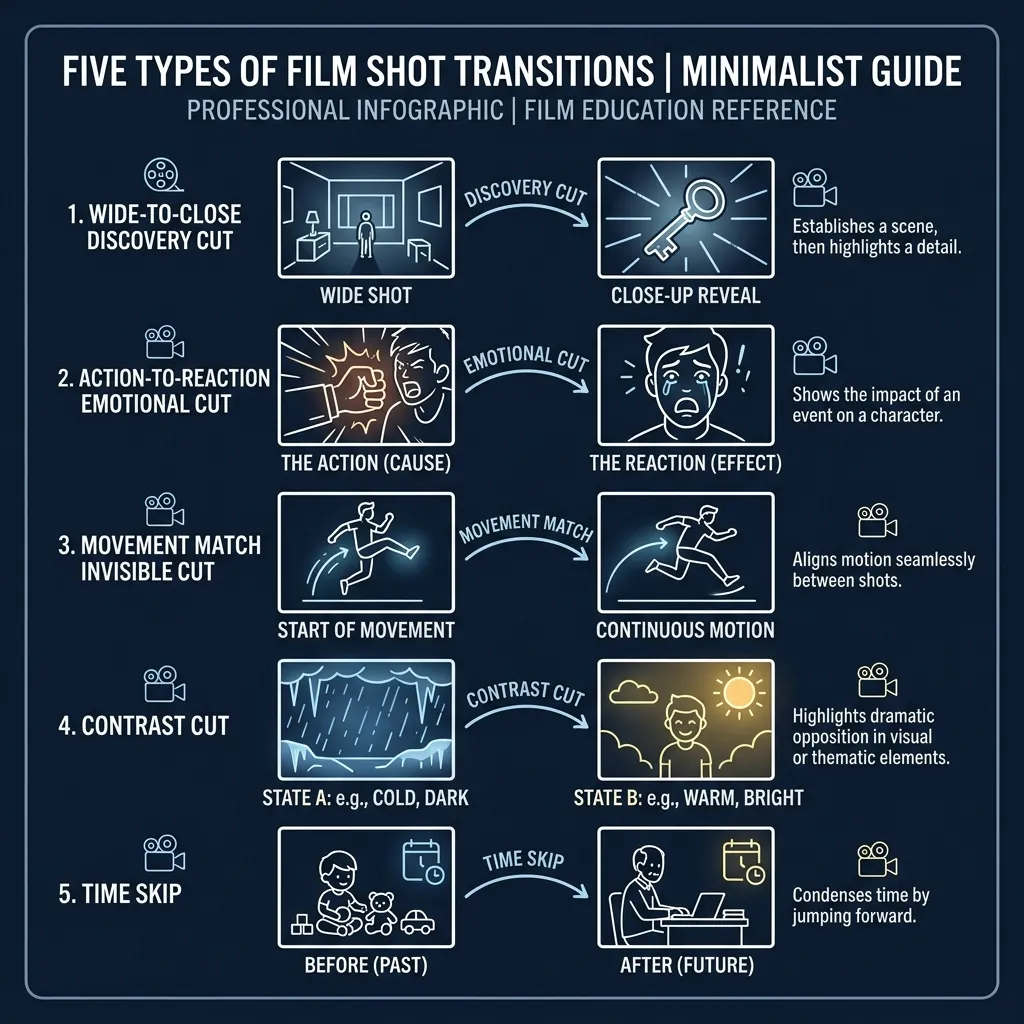
Through testing Kling 3.0 multi-shot, certain transition patterns produce reliably better results than others. These aren't rules. They're starting points that the model handles well.
1. Wide to Close (The Discovery Cut)
First beat: wide or establishing shot that sets the space. Second beat: close-up on the detail that matters. This is the most natural transition because it mirrors how the human eye works: you see the room, then you focus on the thing that caught your attention.
Example prompt sequence:
- Beat 1: "Wide shot, abandoned warehouse interior, dust particles in shafts of light, slow pan across empty floor"
- Beat 2: "Extreme close-up, weathered hand picking up a faded photograph from the floor, shallow depth of field"
2. Action to Reaction (The Emotional Cut)
First beat: something happens. Second beat: someone responds to it. This is the bread and butter of narrative editing. The reaction shot is often more important than the action itself, because it tells the audience how to feel.
Example prompt sequence:
- Beat 1: "Medium shot, glass shattering against a wall, liquid splashing outward, dramatic lighting"
- Beat 2: "Close-up, woman's face turning slowly, expression shifting from surprise to quiet recognition, warm practicals"
3. Movement Match (The Invisible Cut)
Both beats contain movement in the same direction or rhythm. The eye follows the motion across the cut, making the transition feel invisible. This requires thinking about screen direction in both beats.
Example prompt sequence:
- Beat 1: "Tracking shot, figure walking left to right through a crowded market, handheld"
- Beat 2: "Medium shot, same figure emerging from the crowd into an empty alley, continuing left to right, steadicam"
4. Contrast Cut (The Jarring Shift)
Deliberately mismatched shots. Loud to silent. Crowded to empty. Movement to stillness. This works for emotional pivot points, not transitions.
Example prompt sequence:
- Beat 1: "Chaotic wide shot, busy intersection at night, neon reflections on wet asphalt, shaky handheld"
- Beat 2: "Static close-up, single candle flame in a dark room, absolute stillness"
5. Time Skip (The Compression)
Same subject, different time. This is how you compress hours or days into two beats. The key is giving the model enough visual continuity (same subject, same framing) while changing the temporal markers (lighting, clothing, weather).
Example prompt sequence:
- Beat 1: "Medium shot, woman sitting at a desk writing, morning light through window, coffee steaming"
- Beat 2: "Same framing, same desk, now night, desk lamp casting warm pool, empty coffee cups, papers scattered"
Camera Language Carries Across Beats
Everything from the single-shot camera vocabulary applies within each beat of a multi-shot sequence. But there's an additional layer: how camera choices across beats create rhythm.
A consistent camera style (all handheld, all static, all smooth tracking) creates unity. Deliberate camera shifts (steady establishing shot, then handheld for action) create emphasis.
The most common mistake is randomizing camera movement across beats. If beat one is a slow dolly and beat two is a whip pan, the viewer feels the technical inconsistency even if they can't name it. Unless the tonal shift is intentional, keep the camera personality consistent within a sequence.
The First and Last Frame Technique
For maximum control over multi-shot sequences, some practitioners use Kling 3.0's image-to-video capability to lock the start and end frames of each shot.
The workflow: generate your key frames as still images (using Nano Banana 2 or another image model), then use each image as the starting point for a Kling 3.0 image-to-video generation. This gives you precise control over what each beat looks like at its boundaries, while letting the model handle the motion between them.
This is particularly useful for character consistency across shots. If the same character reference image anchors each beat's start frame, the face and clothing stay locked even when the scene changes around them.
Audio Changes Everything in Sequences
Single-shot Kling 3.0 clips with audio enabled produce ambient sound and sometimes dialogue that matches the visual. In multi-shot sequences, audio becomes the connective tissue between beats.
Testing dialogue and lip sync over 15 seconds of multi-shot footage is a different challenge than testing over 5 seconds. Consistency over the full duration matters more than quality in any single frame. A beautiful 5-second clip that doesn't hold across a 15-second sequence is less useful than a slightly rougher clip that maintains coherence throughout.
When evaluating multi-shot results, listen before you look. If the audio flow across beat transitions sounds natural, the visual cuts will feel natural too. If the audio stutters at the transition point, the sequence will feel assembled rather than directed, regardless of how good each individual beat looks.
Prompt Adherence Over Resolution
When working with Kling 3.0 multi-shot, the instinct is to run everything in Pro mode for maximum quality. But resolution is fixable in post-production. Prompt adherence — whether the model actually executes the camera move and action you described — is baked in at generation time.
Standard mode often has better prompt adherence for complex multi-shot sequences because the model allocates more compute to understanding your prompt structure rather than rendering at maximum resolution. If the sequence grammar is wrong in Pro mode, a 1080p version of the wrong sequence doesn't help.
The practical workflow: prototype sequences in Standard mode until the structure works, then re-generate the final version in Pro if the quality bump matters for your use case.
Common Multi-Shot Pitfalls
Writing one long prompt instead of beats. Multi-shot requires distinct scenes. "A woman walks through a market, buys flowers, and takes them home" is one prompt trying to be three beats. Split it.
Ignoring screen direction. If a character exits frame right in beat one and enters frame left in beat two, the viewer's spatial understanding breaks. Unless the disorientation is intentional, maintain consistent screen direction.
Too many beats in one generation. Three beats in a 10 to 15 second generation is the sweet spot. More than that and each beat gets too compressed to establish its visual identity.
Prompt length mismatch between beats. If beat one has 50 words of detailed description and beat two has 8 words, the model treats them as different levels of importance. Keep prompt density roughly balanced across beats.
Forgetting the emotional arc. A sequence needs to go somewhere. Three beats of equal intensity feel flat. Build toward something, even in a short sequence: calm, tension, release. Or: distance, approach, intimacy. The arc is the story.
Every AI video model can generate impressive individual shots. Kling 3.0's multi-shot feature is where the outputs start to feel like they were directed by someone who thinks in sequences, not prompts. New accounts on VicSee get free credits, no credit card required.
Try it now: Kling 3.0 | All AI Video Models
FAQ
How many shots can Kling 3.0 generate in one multi-shot sequence?
Kling 3.0 supports multi-shot generation within its standard duration range of 5 to 15 seconds. The practical limit is 3 to 4 distinct beats in a single generation. Beyond that, individual beats become too short to establish their visual identity.
Do I need to use multi-shot, or can I edit single shots together?
Both approaches work. Multi-shot gives you model-handled transitions and consistent audio across beats. Editing single shots together gives you full control over timing and lets you mix models. Many practitioners use Kling 3.0 for talking head and character shots, then cut in Veo 3.1 B-roll footage that was generated separately.
Does multi-shot work with image-to-video?
Yes. You can provide start and end frame images for each beat, giving you precise control over visual continuity across the sequence. This is the most reliable method for maintaining character consistency across multi-shot scenes.
What's the difference between multi-shot and just writing a longer single prompt?
A single long prompt asks the model to interpret the entire scene as one continuous generation. Multi-shot explicitly separates the generation into distinct beats with their own prompts. The model treats each beat as a separate visual intention with its own camera language, rather than trying to smoothly blend everything into one continuous motion.
Should I use Standard or Pro mode for multi-shot?
Start with Standard mode to prototype your sequence structure. Standard mode often has better prompt adherence for complex multi-shot sequences. Once you're satisfied with the sequence grammar and beat structure, re-generate in Pro mode if the resolution bump matters for your final output.
VicSee gives you access to Kling 3.0 alongside every other major AI video model. Compare results across Seedance 1.5 Pro, Veo 3.1, and Sora 2 without switching platforms. New accounts get free credits, no credit card required.