For the past two weeks, one workflow has filled the AI creator timeline on Twitter. Generate a storyboard in GPT Image 2. Animate the frames in Seedance 2.0. Stitch the clips together. The demos hit hundreds of thousands of views. One went past a million. Paid platform partnerships piled on, claiming the combo as their feature.
The workflow is real. The framing in most of the demos is wrong.
GPT Image 2 is not replacing Nano Banana 2. Seedance 2.0 is not the only model that can animate a storyboard frame. And the storyboard itself is not what makes the sequence hold together. This guide walks through what the workflow actually is, what makes it work, and what tends to break in production. We will use a demo we generated this week as the working example.
GPT Image 2 is a New Tier, Not a Replacement
The most common misframing on Twitter has been "GPT Image 2 vs Nano Banana 2." It treats them as competing finals: pick one, get a better image. That is not what is happening.
GPT Image 2 is good at producing storyboard frames. Compositionally clean shots that read at a glance, with consistent lighting, recognizable character silhouettes, and clear staging. It is not the model you reach for when you need final-render skin texture or product-shot precision. It is the model you reach for when the next step is animation.
Nano Banana 2 is good at producing finals. Photorealistic detail, surface accuracy, lighting physics that hold up at full resolution. It rewards prompt engineering and reference quality. It is the model you reach for when the image itself is the deliverable.
The two models do different jobs. The reason GPT Image 2 went viral paired with Seedance 2.0 is not that it beat Nano Banana 2 in a head-to-head. It is that GPT Image 2 happens to be very good at the specific job of producing keyframes that an animation model can consume cleanly. That is a tier of work that did not have a dedicated tool until Apr 20.
Treat it that way. Do not pick GPT Image 2 to make a final image. Pick it to make a frame your video model will animate next.
The Anchor Frame: The Insight Most Demos Skip
Here is the part most creator posts demonstrate but never name out loud.
The storyboard is not what makes the sequence consistent. The anchor frame is.
Every clip in a storyboard-to-animation sequence is generated against an image. That image fixes the character, the lighting, the wardrobe, the environment, the lens. The animation model's job becomes a constraint problem, not a generation problem from scratch. It does not have to invent the world. It has to move what already exists.
Once the storyboard frames are locked, every animated clip downstream inherits their decisions. Which means the consistency of an 8-shot sequence is mostly determined before the video model runs at all. Heather Cooper put this most directly in late April: "ChatGPT made a storyboard from a single reference image, then I used Seedance 2.0 to animate the storyboard shots." The single reference image was doing more work than the storyboard. The storyboard was just the place where that reference's identity got serialized into the cuts.
This is why the workflow is robust to model swaps. The next image model that produces clean keyframes will plug in and work. The next video model that consumes reference images will plug in and work. What does not change is the discipline of locking your anchors before you start generating motion.
The Workflow, Step by Step
Here is the workflow we ran this week, end to end, to produce the desert nomad sequence below.
Step 1: Define the scene in plain sentences
Before any model runs, write each shot as one sentence. We did two:
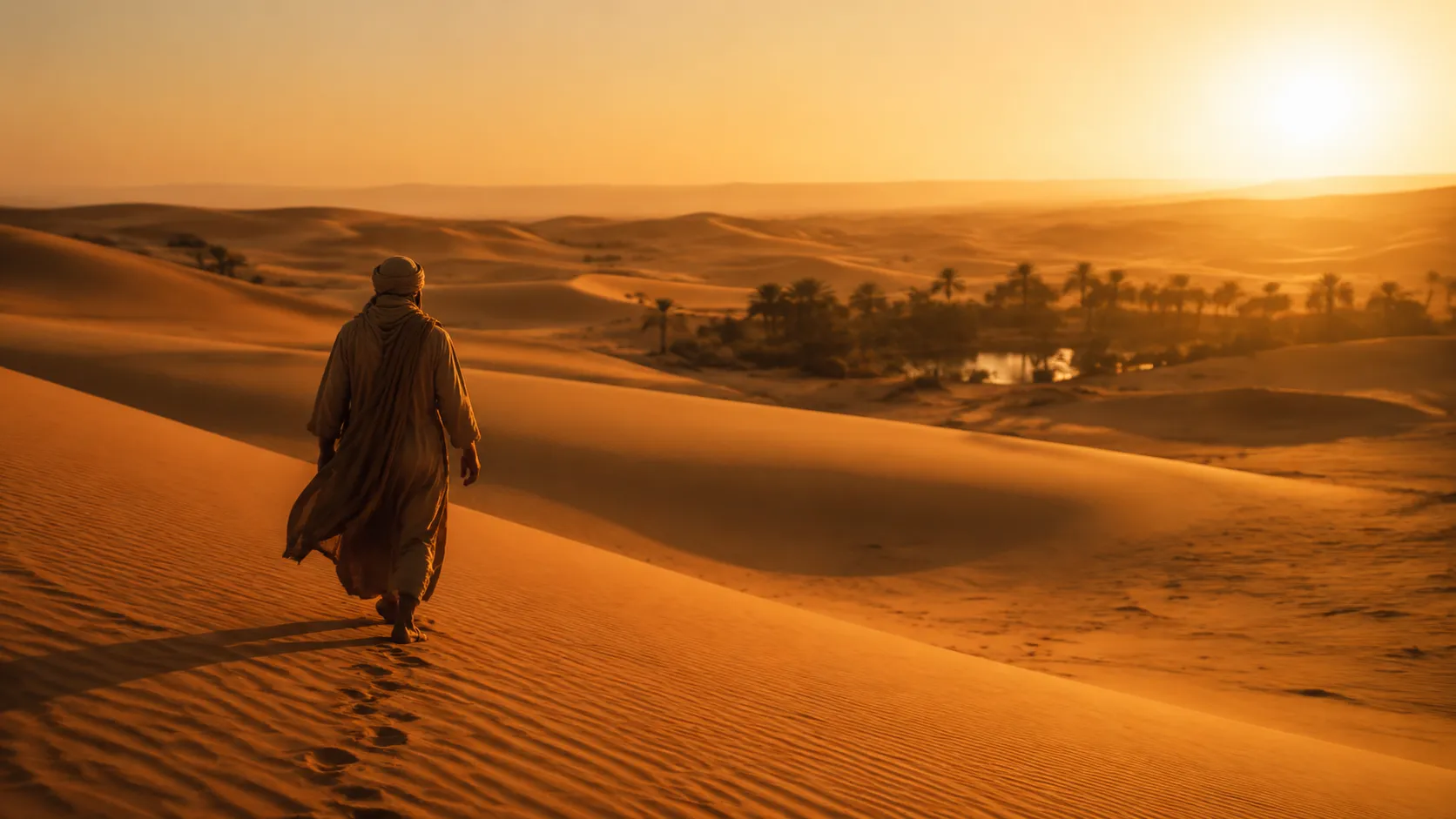
- Wide cinematic shot of a lone desert nomad walking across orange dunes toward a distant oasis, golden hour.
- Medium close-up of the same nomad kneeling at the oasis pool, cupping water near the face.
That is the storyboard. Two beats, one character, one environment, one lighting condition. The discipline is to keep each beat to one sentence so the visual is clear before you prompt anything.
Step 2: Generate the storyboard frames in GPT Image 2
Prompt each frame with the same shared style language. Keep the character description and lighting consistent across frames. The key parameters: 16:9 aspect ratio for cinematic crop, 1K resolution for storyboard tier (the animation step does not need 2K source).
Frame 1 (wide):
Frame 2 (close-up):
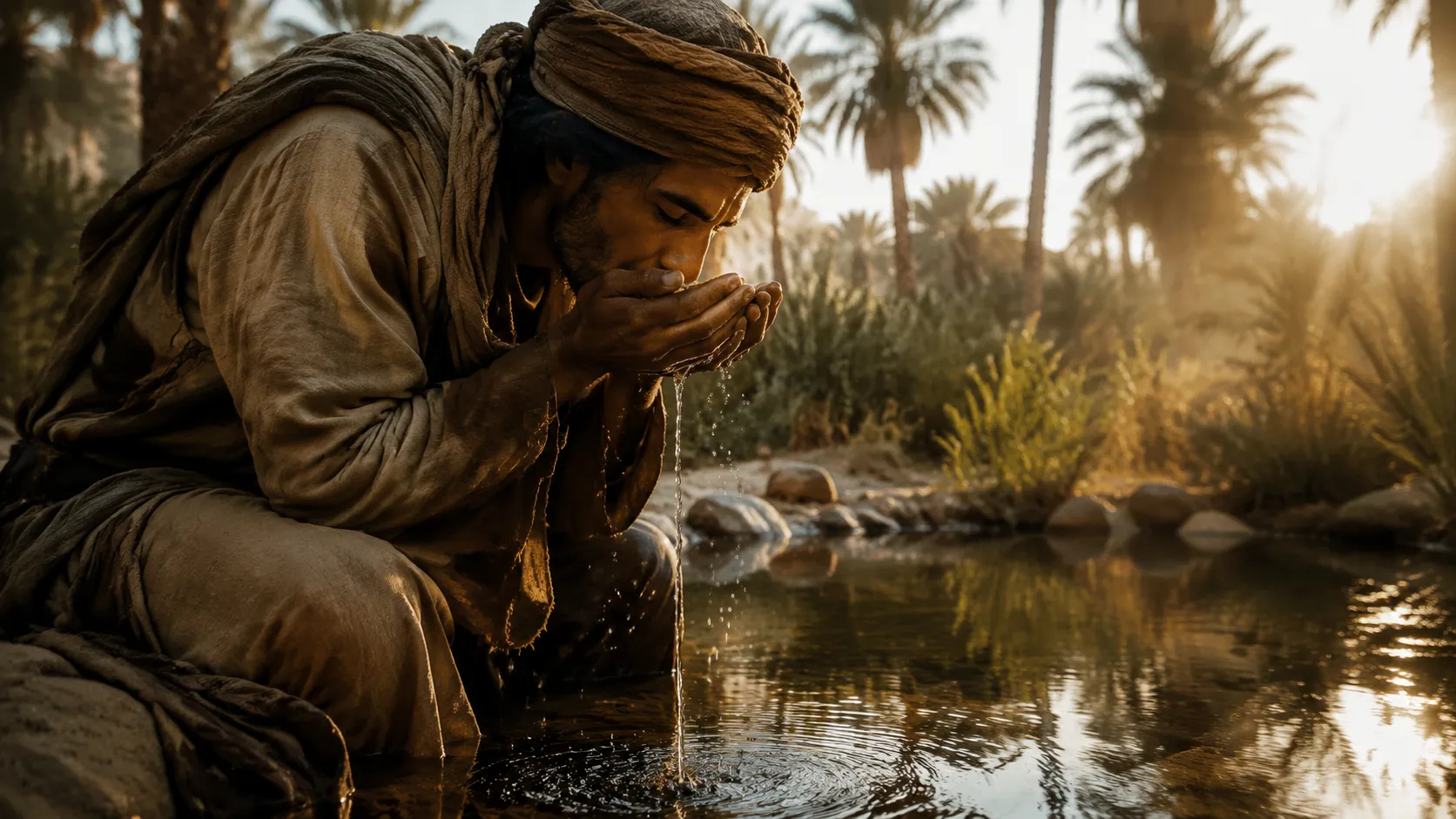
These two frames share the same robe, the same skin tone, the same golden hour light. That is not a happy accident. It is the result of writing both prompts before generating either, with the same style language clauses copied across. If the first frame had drifted to a different ethnicity or wardrobe, we would regenerate it before moving on. Anchor quality compounds. So does anchor inconsistency.
Step 3: Identify the anchor
Pick the frame that has the most identity load. Usually it is the wide establishing shot — character, wardrobe, and environment all visible at once. That frame is the anchor for the rest of the sequence. If you are running a longer storyboard, keep one identifiable anchor frame and treat the others as cuts within its world.
Step 4: Animate using omni reference, not text-to-video
Seedance 2.0 supports an omni reference mode that takes up to nine images and a multi-shot prompt. Use it. Do not animate from text alone when you have storyboard frames already.
Feed both frames as references. Write a multi-shot prompt that calls out which frame anchors which shot:
Cinematic two-shot golden hour desert sequence, anamorphic film look,
consistent character and lighting throughout.

Shot 1 (4s) [Image 1]: wide establishing — the nomad walks across the
orange dune toward the distant oasis, robe trailing in the wind, slow
steady camera.

Shot 2 (6s) [Image 2]: medium close-up at the oasis — the nomad kneels
and slowly cups water, lifting it toward his face, droplets fall back
into the pool, dust particles drift in the light, gentle slow push-in.

Match-cut transition between shots.
Set duration at 10s for a two-beat sequence. Resolution at 720p is enough for Twitter and most embedded use. 1080p if you are publishing to YouTube or planning a longer cut.
The result animates between the two anchor frames in a single generation. No stitching. No multi-clip render pipeline. The transition is the model's job.
Step 5: Iterate on motion, not on composition
If a clip does not work, the failure is almost always motion-related. The character moves wrong. The camera drifts. The transition is jarring. Resist the urge to regenerate the storyboard frame. The frame is fine. Rewrite the motion prompt for that beat and rerun the animation step alone.
Composition iteration is expensive. Motion iteration is cheap. The workflow only stays cheap if you respect that asymmetry.
The two GPT Image 2 frames cost 16 credits combined. The Seedance 2.0 omni reference clip is one generation. Generate the storyboard once with care. Animate as many times as you need.
The workflow is now native on multiple platforms. New accounts get free credits, no credit card required.
Try the workflow: Storyboard frame in GPT Image 2 → | Animate in Seedance 2.0 | All AI Video Models
What Breaks in Production
Five failure modes show up over and over once you run this workflow on real projects.
Character inconsistency across frames. GPT Image 2 will drift on ethnicity, wardrobe, and face if you do not constrain it. The fix is style language repetition. Copy the character description verbatim across every frame's prompt. Do not paraphrase between frames. The model treats minor wording differences as new identities.
Aspect ratio mismatch. Generate storyboard frames at the aspect ratio you will deliver. 16:9 for cinematic and YouTube. 9:16 for vertical and short-form. Do not generate at 1:1 and crop later. The animation model will fight you for any pixel of crop because it reads the entire frame as the world.
Storyboard over-detail. A frame that crowds the composition with five subjects, two light sources, and a complex background is hard to animate. Less is more. Wide establishing, medium with motion, close-up with gesture. Three shot grammar moves cover most short-form sequences. Save the maximalist composition for finals, not for animation seeds.
Motion drift past 10 seconds. In practice, Seedance 2.0 tends to hold shape well across 4-10 second clips. Drift becomes more visible past the 10-second mark, with the model improvising details that pull away from the anchor. If you want a 30-second sequence, generate three 10-second clips with explicit anchor handoff between them rather than one long clip.
Lighting inconsistency between shots. Storyboard frames at golden hour and shots at neutral midday will not match-cut, even with the same character. Lock the lighting condition in the shared style language. Treat lighting as character, not as setting.
These failure modes are predictable. They show up before you run anything. Catching them at the prompt step costs nothing. Catching them after a storyboard frame costs single-digit credits. Catching them after a 4-second Seedance 2.0 1080p run on VicSee costs 550 credits. The cost ladder gets steeper fast. Validate at the cheapest step.
The Chaining Is The Skill
The thesis behind the entire workflow is simple. The models are commodifying. GPT Image 2 will not be the only storyboard tier model in six months. Seedance 2.0 will not be the only animation tier model. The next wave will look different and run on different APIs.
What does not commodify is the practitioner's judgment about which storyboard layout fits which animation style. Wide-medium-close grammar fits documentary realism. Match-on-action fits action sequences. Establishing into character close-up fits emotional beats. The model only generates what you anchor it to.
This is why the chaining matters more than the models. Picking the right anchor for the right motion is the directorial skill. The model executes. You direct.
The reason this workflow took off in the past two weeks is not that two new models shipped. It is that the combination made directorial discipline visible to a much wider audience for the first time. Storyboarding has been a skill since the silent film era. The new part is that one person can now run the whole pipeline in a single afternoon.
FAQ
Do I need a paid platform like Higgsfield to run this combo?
No. GPT Image 2 and Seedance 2.0 are both available natively on multiple platforms via API. The workflow works wherever both models are accessible. The paid-partnership posts you have seen on Twitter are marketing spend, not capability gating.
Can I use Nano Banana 2 instead of GPT Image 2 for storyboards?
Yes, but the trade is real. Nano Banana 2 tends to produce more photorealistic storyboard frames, which can help if your final delivery is hyper-real. It also tends to over-render: lots of detail, surface texture, dense backgrounds. That density makes downstream animation harder. GPT Image 2's slightly more graphic, less photorealistic output happens to be easier for animation models to consume cleanly. Use Nano Banana 2 when realism matters more than animation simplicity. Use GPT Image 2 when the next step is video.
How do I keep characters consistent across frames?
Two techniques. First, style language repetition: copy the character description verbatim across every frame's prompt. Do not paraphrase. Second, single-reference anchoring: generate one strong reference frame, then use it as the basis for all downstream frames in the storyboard. This is the technique creators have been calling "the single reference image is doing more work than the storyboard." It is correct.
What is the cheapest way to test this workflow?
Generate two GPT Image 2 frames at 1K (16 credits total). Use them as omni reference for a single Seedance 2.0 clip at 720p. Total cost is the storyboard plus one animation generation. You will know within one round whether the workflow fits your subject. Do not commit to a 12-frame storyboard before validating the two-frame test.
Why not just use Seedance 2.0 from scratch without any storyboard?
You can. Text-to-video works. The trade-off is consistency. Without anchor frames, the model invents the world from scratch on each clip. Across multiple shots, the world drifts. Different lighting, different character, different lens. For a single 10s clip, text-to-video is fine. For a sequence, the storyboard step pays for itself almost immediately.
The Workflow is Native on VicSee
Both GPT Image 2 and Seedance 2.0 are live on the platform. The unified generator runs the full pipeline from one workspace, no agent middleware, no platform-specific tags. Generate storyboard frames in the image tab, switch to video, drop the frames as omni reference, write the multi-shot prompt. The whole sequence happens in a single session.
New accounts get free credits, no credit card required. Run the two-frame test described above and decide whether the workflow fits your project before scaling up.