Most AI image prompting advice sounds the same. Write a long description, add style keywords, hope for the best. The result is a prompt like this: "A beautiful woman standing in a sunlit meadow, golden hour, photorealistic, 8K, highly detailed, cinematic lighting, shallow depth of field, professional photography, award-winning." Five hundred characters of keywords stacked on top of each other.
That approach worked in 2024. In 2026 it produces mediocre results because the models have gotten better at interpreting structure but worse at handling contradictory keyword soup. The practitioners getting the best outputs from models like Nano Banana 2 and Seedream have moved on to three fundamentally different approaches: JSON-structured prompts, reference images as implicit prompts, and phase-structured design thinking.
This guide covers all three, with real examples from practitioners who are using them in production.
Why LLM-Generated Prompts Make Things Worse
Before diving into what works, it is worth understanding why the most common shortcut fails. Many creators paste their idea into ChatGPT or Claude, ask for an image prompt, then feed the result into their image model.
The problem is that language models write prompts in their own style: verbose, descriptive, and full of abstract qualifiers. A prompt like "evocative atmosphere with a sense of nostalgic wonder" is meaningful to a human reader but meaningless to an image model that was trained on concrete visual descriptors.
One creator discovered this the hard way while trying to generate videos with Seedance 2.0. The Claude-generated prompt over-described the scene and added contradictory details that confused the model. Switching to short, specific, visual descriptions produced dramatically better results. The fix was a prompt structured as: subject doing action, camera angle, lighting mood, environment.
The lesson is counterintuitive: the more detailed your text prompt, the worse your results can get. Image models do not need emotional context. They need spatial and visual specificity. This is the core reason why the three approaches below outperform traditional prompting. Each one constrains the model's interpretation in a way that keyword lists cannot.
JSON-Structured Prompts: Treating the Model as a Design API
The most radical shift in AI image prompting is treating the image model not as an artist you describe a scene to, but as a design API you send structured specifications to.
One practitioner shared a JSON-structured prompting system for generating ultra-realistic AI influencer images with Nano Banana 2. The prompt included explicit specifications for shadows, typography, panel layouts, and even deliberate imperfections. The key principle was "Imperfection is Realism": rather than prompting for flawless output, the JSON structure instructed the model to simulate iPhone camera artifacts like blown highlights, digital noise, and slightly off framing. The post earned 180 bookmarks with only 5 replies, a 36:1 ratio that signals people treating it as a reference document.
A different creator took the same approach further by using JSON to create sports equipment breakdown layouts. The structured prompt specified exact panel positions, typography hierarchy, and brand color codes. The post earned 254 bookmarks with zero replies, the highest save-to-engagement ratio in weeks of tracking. People were not engaging to discuss it. They were silently saving it as a template.
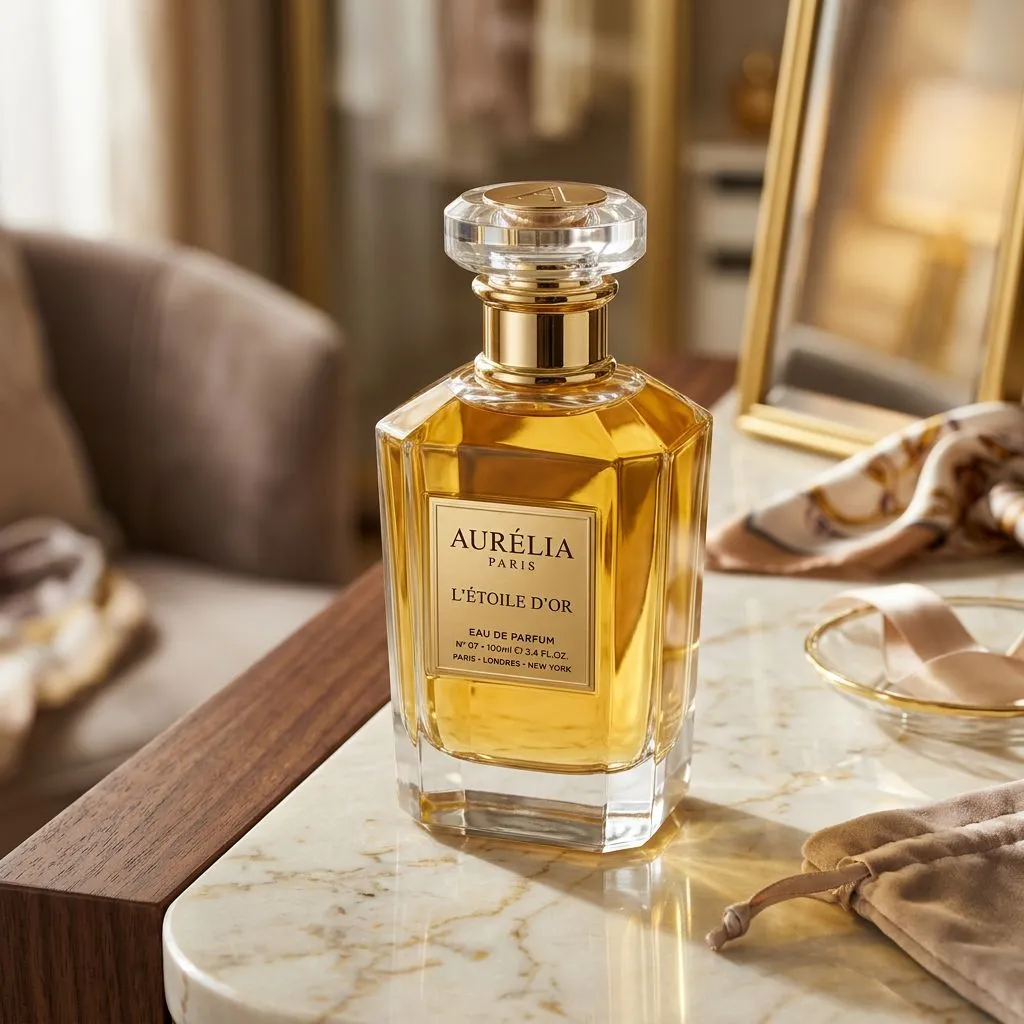
Here is what the difference looks like in practice. Both images below were generated with Nano Banana 2 using the same concept: a luxury perfume bottle, product photography.
Keyword prompt: "A luxury perfume bottle on a beautiful surface, elegant, premium feel, studio lighting, photorealistic, 8K, highly detailed, cinematic, professional product photography, award-winning, luxurious atmosphere, golden accents, beautiful bokeh background, sophisticated, high-end brand aesthetic"
JSON-structured prompt: {"subject": "single frosted glass perfume bottle, rectangular, matte silver cap", "surface": "wet black marble slab with visible water droplets", "lighting": {"key": "single softbox from upper left at 45 degrees", "fill": "none, deep shadows on right side", "accent": "thin rim light from behind catching the glass edges"}, "camera": "eye-level, 85mm lens, f/2.8", "background": "seamless dark charcoal gradient", "mood": "minimal, cold, editorial"}
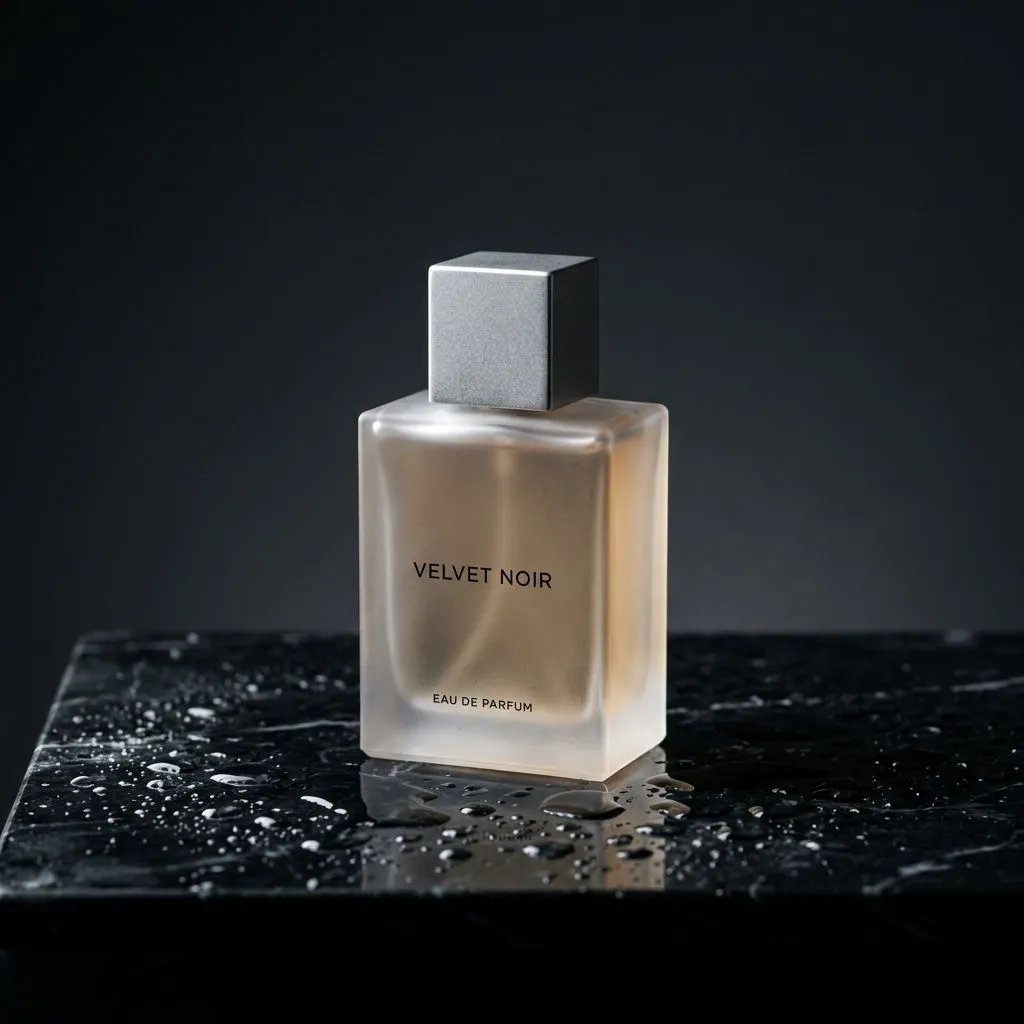
The keyword prompt produced a beautiful image, but the model made every creative decision: the warm golden palette, the vanity scene background, the crystal cap shape. The structured prompt produced an image where the frosted glass, matte silver cap, wet black marble, rim lighting, and cold editorial mood are all present exactly as specified. Both are good images. Only one matches a design brief.
The reason JSON works is straightforward. A natural-language prompt like "create a product layout with the item centered and specs on the right side" gives the model room to interpret. A JSON object with "layout": {"product_position": "center", "specs_panel": "right_40pct"} constrains interpretation to one outcome. You are narrowing creative variance from a spectrum to a point.
This approach is most valuable when you need repeatable, consistent outputs: product shots, marketing banners, social media templates. Anywhere the output needs to match a design spec rather than express artistic vision.
Reference Images: The Prompt You Do Not Have to Write
The second approach eliminates most of the text prompt entirely. Instead of describing the style, perspective, and palette you want, you provide a reference image and let the model extract those qualities directly.
One AI workflow creator demonstrated this with Nano Banana 2 by generating a Pokemon-style game overworld. The prompt was remarkably minimal: "create a screenshot of the overworld for this game in the same area, with one pokemon following the player, fit the vibe of the reference." No style keywords, no lighting descriptions, no resolution specifications. Just a reference image and a short instruction.
The result matched the pixel art style, color palette, and visual tone of the reference perfectly, because the model extracted all of that information from the image itself. The prompt was doing less work because the reference was doing more.
This matters for AI image prompting because it inverts the traditional bottleneck. Instead of spending time crafting the perfect text description, you spend time finding or creating the perfect reference. For many use cases, finding a reference image that matches your vision takes seconds. Describing the same vision in text takes paragraphs and still leaves room for misinterpretation.
Reference-based prompting works especially well with models that support image-to-image capabilities. Nano Banana 2 handles reference inputs natively, as does FLUX 2 in its Flex mode. The key is keeping your text prompt short and letting the reference carry the visual weight.
Phase-Structured Prompts: Design Thinking, Not Visual Description
The third approach treats the prompt not as a description of an image but as a compressed version of a design process.
One AI prompt engineer shared a phase-structured system for generating high-fashion campaign banners with Nano Banana 2. The prompt was organized in sequential phases: brand alignment first (color codes, typography family, brand mood), composition second (layout grid, focal point, negative space), typography system third (headline weight, tagline placement, CTA hierarchy). The post earned 56 bookmarks on 2.9K views, indicating practitioners saving it as methodology.
Most prompts describe what the image should look like. A phase-structured prompt describes the design thinking process that would produce the image. The model follows the reasoning chain instead of matching keywords.
The difference is subtle but significant. A keyword prompt says "luxury brand campaign, gold accents, sans-serif typography." A phase-structured prompt says "Phase 1: brand identity is minimalist luxury, primary palette black/gold, secondary white. Phase 2: composition uses rule of thirds, product at left intersection, negative space right for typography. Phase 3: headline 72pt sans-serif gold, tagline 24pt white below." The second version produces images that look like they came from a design brief rather than a keyword search.
This approach is especially powerful for commercial work: ads, campaign materials, landing page hero images. Anywhere the output needs to feel intentional rather than generated.
VicSee gives you access to the best AI image models in one place, from Nano Banana 2 for photorealistic generation to FLUX 2 for creative styles and Seedream for ultra-fast iteration. New accounts get free credits, no credit card required.
Try it now: Nano Banana 2 | FLUX 2 | All Image Models
Which Approach to Use When
The three approaches are not mutually exclusive. The best practitioners combine them depending on the use case.
JSON structure works best for repeatable design outputs. Product shots, social media templates, marketing banners. Anything where you need the same layout with different content.
Reference images work best for style matching. When you know exactly what you want the image to feel like but would struggle to describe it in words. Concept art, mood boarding, style transfer.
Phase-structured prompts work best for commercial design. Campaign materials, brand assets, presentations. Anything where the output needs to follow a design brief.
The common thread across all three is constraint. Each approach reduces the model's interpretive freedom in a different way. JSON constrains through specification. References constrain through example. Phase structure constrains through process. All three outperform traditional keyword prompting because they give the model less room to guess wrong.
The 500-character keyword prompt is not technically dead, but the gap between what it produces and what structured approaches produce is growing with every model update. Models are getting better at following structured instructions and worse at disambiguating keyword soup. The direction is clear.
FAQ
Do JSON prompts work with all AI image models?
JSON-structured prompts work best with models that have strong instruction-following capabilities. Nano Banana 2 and FLUX 2 handle JSON structure well. Older models may interpret JSON brackets as literal text to render in the image. Test with a simple JSON prompt first to verify your model parses structure correctly.
Can I use reference images and text prompts together?
Yes, and this is often the strongest approach. Use a reference image to set the overall style, composition, and palette, then use a short text prompt to specify what is different from the reference. Keep the text minimal. The more text you add alongside a reference, the more you risk contradicting what the reference already communicates.
How long should an AI image prompt be in 2026?
Shorter than you think. The practitioners getting the best results are using 50-150 words of precise visual description rather than 500 words of stacked keywords. Quality of description matters more than quantity. One sentence with a specific camera angle, lighting direction, and subject position outperforms a paragraph of aesthetic adjectives.
Is prompt engineering still relevant with newer models?
More relevant, not less. As models improve at following instructions, the quality gap between a well-structured prompt and a generic one widens. Earlier models had a low ceiling regardless of prompt quality. Current models like Nano Banana 2 have a much higher ceiling, but only if you give them structured input that takes advantage of their instruction-following capabilities.
Should I stop using ChatGPT to write image prompts?
Not necessarily, but you should stop using the raw output. LLM-generated prompts tend to be verbose and include abstract qualifiers that image models cannot interpret. If you use an LLM, treat its output as a rough draft that you then edit down to concrete visual descriptors. Remove any emotional or atmospheric language. Keep only what describes something the model can literally render.
VicSee makes AI image generation accessible with every major model in one place. Whether you prefer Nano Banana 2 for photorealism, FLUX 2 for creative work, or Seedream for speed, all models are available with the same simple interface. New accounts get free credits, no credit card required.