AI character consistency is the single biggest pain point in AI video production right now. Everyone who has tried to make an AI short film, YouTube series, or multi-scene project has hit the same wall: the character looks different in every shot.
The standard advice is to use the same prompt, the same model, and hope for the best. That advice is wrong. The problem is almost never the model. It is the reference image.
Why Prompt Repetition Fails
Most creators approach character consistency by writing a detailed character description and pasting it into every generation. "Young woman with auburn hair, green eyes, wearing a blue jacket" — same prompt, every scene.
This fails for a predictable reason: text-to-image models generate from probability distributions, not from memory. Each generation samples independently. "Auburn hair" can produce fifty different shades across fifty generations. The model is not remembering your character. It is guessing each time.
The same problem gets worse with text-to-video. When you prompt Seedance 2.0 or Kling 3.0 with a character description, the model interprets that description fresh for every clip. Even subtle variations in lighting, angle, and facial structure compound across a sequence until the character is unrecognizable.
The Reference System: How It Actually Works
The fix is not a better prompt. It is a better reference image. Here is the system that scales.
Step 1: Generate a Clean Reference Portrait
Your reference image is the foundation of every scene that follows. The quality of this single image matters more than the model you use, the prompt you write, or the number of generations you run.
What a good reference looks like:
- Front facing, looking directly at camera
- Neutral expression (not smiling, not frowning)
- Soft, even studio lighting with no hard shadows
- Clean background (solid gray or white)
- High detail on facial features, hair texture, skin
What a bad reference looks like:
- Dramatic scene with harsh side lighting
- Character looking off camera at an angle
- Colored lighting that tints skin and hair
- Busy background competing for the model's attention
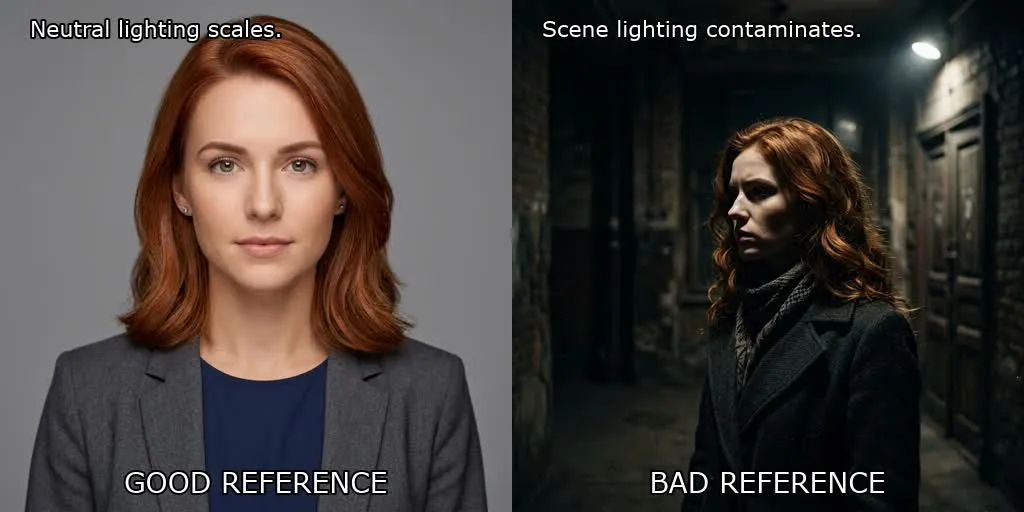
The difference is not aesthetic preference. A dramatic scene carries its lighting and camera angle into every generation after it. The model treats the entire reference as a style guide, not just the face. Warm side lighting in the reference means warm side lighting in every scene, even when the scene calls for cold daylight.
A neutral reference lets the model focus on what matters: the character's face, hair, and body proportions. Scene-specific details like lighting, camera angle, and background are added through the scene prompt, not inherited from a contaminated reference.
Step 2: Test Before You Scale
Before building an entire project on a reference image, test it. Generate three to four variations with different scene descriptions:
- The character in a coffee shop, morning light
- The character running through rain at night
- The character sitting at a desk, overhead fluorescent lighting
- A close-up portrait with a different expression
If the character holds across all four, the reference is good. If the face drifts or the lighting bleeds, regenerate the reference with more neutral conditions.
This takes ten minutes and saves hours. Most consistency failures happen because the reference was never tested. The creator generated one portrait, liked how it looked, and assumed it would scale.
Step 3: Build Your Image Legend
A reference image is one file. A production needs an organized system.
This concept, which some creators call an "Image Legend," means organizing every reference asset with a strict naming convention before touching the video model. Characters, environments, props — each gets a numbered slot with a clear label.
For example:
ref-01-character-maya-front.jpg— Main character, front facingref-02-character-maya-profile.jpg— Main character, profile viewref-03-environment-apartment.jpg— Apartment interiorref-04-environment-street-night.jpg— Night street sceneref-05-prop-red-jacket.jpg— Signature clothing item
When every reference is organized before generation starts, you stop improvising. Each scene prompt pulls from the same set of verified assets. The model receives consistent input, and the output stays consistent.
Step 4: Use Reference as Input, Not Inspiration
The critical distinction: the reference image should be the actual input to an image-to-video or image-to-image generation, not just a mental guide you try to describe in text.
On platforms like Seedance 2.0, the omni reference system lets you assign up to nine reference images with specific roles. Your character reference goes in as a face/body anchor. Your environment reference goes in as a setting anchor. The model uses these as concrete constraints, not suggestions.
This is the difference between telling the model "generate a woman with auburn hair" (interpretation varies every time) and showing the model exactly which woman you mean (interpretation is locked to the reference).
Face Lock vs Performance Lock
A common misconception is that character sheets solve consistency. They are a starting point, not a solution.
A character sheet — generating a grid of poses from a single prompt — gives you what practitioners call a "face lock." The model can reproduce the same face across the sheet because it generated all poses in a single pass.
The harder problem is "performance lock." Maintaining the same character across different poses, lighting conditions, emotional expressions, and environments is where most projects stall. The face might stay consistent, but the eyes, the posture, the way light wraps around the jaw — these shift between generations and break the illusion of a continuous character.
This is why the reference quality matters so much. A front-facing portrait with neutral lighting gives the model the clearest possible signal about facial structure. A dramatic scene gives the model a face mixed with lighting artifacts, color casts, and angle distortions. When that contaminated reference feeds into a new scene, the model has to separate the face from the scene — and it consistently gets this wrong.
Reference Quality Matters More Than Model Quality
This is the counterintuitive insight that most tutorials miss: upgrading your model does not fix consistency problems caused by bad references.
A mediocre model with a perfect reference will produce more consistent results than a state-of-the-art model with a contaminated reference. The reference is the input signal. The model is the processor. A better processor cannot fix a corrupted signal.
This is why open-source character consistency workflows — like the ones recently shared by practitioners working with Seedance 2.0 — emphasize reference preparation as the first step, not model selection. The workflow is: generate reference, verify reference, organize references, then generate scenes. The model comes last.
The Practical Workflow
Here is the complete workflow, start to finish:
-
Generate reference portraits using Nano Banana 2 or your preferred image model. Front facing, neutral lighting, clean background. Generate two to three candidates and pick the strongest.
-
Test the reference across four different scenes (different lighting, different environments, different emotions). If the character drifts, regenerate the reference.
-
Build your image legend. Name every reference file with a clear convention. Characters, environments, props — each gets a numbered slot.
-
Generate scenes using the reference as image-to-image or omni reference input. The scene prompt describes only the scene — lighting, camera angle, action. The reference handles the character.
-
Review in sequence. Watch all generated scenes back to back. If one scene breaks consistency, regenerate it with the same reference. Do not fix it by changing the reference.
VicSee gives you access to the models mentioned in this guide, including Seedance 1.5 Pro for AI video and Nano Banana 2 for reference portrait generation. New accounts get free credits, no credit card required.
Start here: Seedance 1.5 Pro | Nano Banana 2 | All AI Video Models
FAQ
Why does my character look different in every scene?
You are probably regenerating from a text prompt each time. Text prompts sample independently, so the model interprets your character description differently for each generation. Use a reference image as input instead of relying on text descriptions alone.
What makes a good reference image for character consistency?
Front facing, neutral expression, soft even lighting with no hard shadows, and a clean background. The reference should show only the character without scene-specific elements that would contaminate future generations.
Does the AI model matter for character consistency?
Less than most people think. Reference quality has a bigger impact on consistency than model choice. A clean reference on a mid-tier model will outperform a dramatic scene reference on a top-tier model. Focus on the input signal first, then optimize the model.
Can I use a photo of myself as a reference?
Yes, but follow the same rules: front facing, even lighting, clean background. Selfies with strong shadows or unusual angles will carry those artifacts into every generated scene. A simple, well-lit headshot works best.
What is an image legend?
An image legend is a naming system for all your reference assets: characters, environments, and props. Each reference gets a numbered slot with a descriptive label. This prevents improvisation during generation and ensures every scene pulls from the same verified set of references.
VicSee gives you access to Seedance 1.5 Pro, Nano Banana 2, Kling 3.0, and more than a dozen AI video and image models in one workspace. Upload your reference images, generate consistent scenes, and build multi-shot sequences without switching platforms. New accounts get free credits, no credit card required.