
Most people trying AI filmmaking are stuck optimizing the wrong thing. They spend hours refining prompts, chasing the perfect generation, running 30 variations of the same clip. The result is slightly better clips that still look unmistakably like AI video.
The filmmakers making work that actually looks cinematic have a different approach. They treat AI ai filmmaking post-production as the craft layer — where color grading, strategic cuts, pacing, and B-roll placement transform adequate clips into something that holds attention.
The generation is the raw material. Post is where the film gets made.
The Generation Ceiling
Every AI video model has a ceiling, and experienced creators hit it faster than beginners do. The ceiling isn't resolution or clip duration — it's the model's ability to handle timing, transitions, and character continuity with precision.
As the team at Anima_Labs observed when working with AI video at scale: prompts hit a ceiling for timing, transitions, and character continuity. Node-based workflows — where you treat each clip as a composable element in a larger pipeline — map to how traditional production actually works. You're not writing one prompt for an entire sequence. You're building a pipeline where each generation has a specific job.
The lesson from EHuanglu, who has been making AI video since the first generation of tools: per-second prompting is suggesting rather than directing. True keyframe control — locking a character's pose or expression at a specific frame — isn't reliably available yet. Which means the gaps between what you prompted and what you got have to be solved in post.
This isn't a limitation to wait out. It's the workflow reality right now, and the filmmakers producing consistent, watchable work have adapted their process around it.
Color Grading and Speed Ramping: The Fastest Quality Gap to Close
The single clearest finding from practitioners making AI short films: post-processing hides AI tells better than prompt optimization does.
Color grading is the most direct tool. Raw AI video clips often have a floating, slightly unreal quality to the color — not wrong, but inconsistent between clips. A coherent color grade applied across all clips forces visual cohesion. The clips look like they were shot in the same world because they're lit and toned the same way, even if the model handled each one differently.
Speed ramping is the second technique. AI video often has natural motion but lacks the intentional rhythm that makes edited video feel directed. A slow push into a slow ramp out of a key moment — a technique borrowed directly from commercial filmmaking — adds tension and emphasis that no prompt produces. The viewer feels the weight of the cut.
Strategic cuts are the third piece. Knowing when to cut is the editor's instinct, not the model's output. Shorter clips that cut before the model's motion starts to drift maintain consistency better than longer clips that expose inconsistency. Cutting on action — the standard editing principle — applies identically to AI video. The model generates the action; the editor decides when it ends.
B-Roll as Consistency Mask
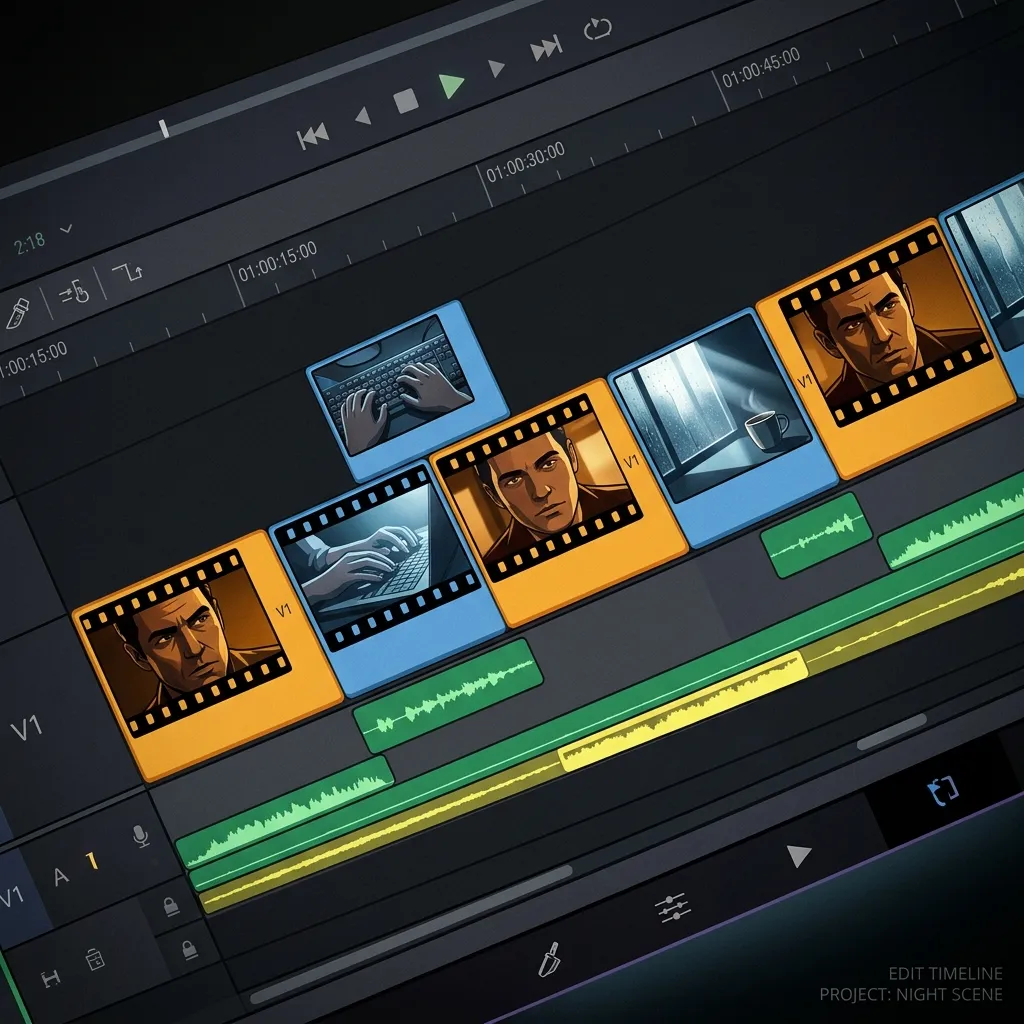
One of the more practical techniques circulating among AI filmmakers working with avatar-based content comes from Calico AI founder recap_david: B-roll as consistency mask.
The technique addresses one of the hardest problems in AI narrative video — character consistency across clips. When you cut between different generations of the same character, there are moments where consistency drifts: a different hair highlight, a slightly different jaw angle, a background element that doesn't match. These seams are where the production reveals itself as AI.
B-roll covers those seams. Cutaway shots — a hand on a surface, a window, an object in the scene — give the editor room to cut away from a consistency problem and cut back to a cleaner take. The B-roll doesn't need to be elaborate. It needs to provide editorial breathing room around the moments where the main character generation is weakest.
This is a production technique, not a prompt technique. You're not trying to generate more consistent clips. You're building an editorial strategy that accounts for the inconsistency before it appears in the final cut.
Style Choices That Work With the Model
Some of the most technically consistent AI short films in circulation use a specific stylistic choice: black and white.
The reason is practical. Color inconsistency between clips is one of the most noticeable AI tells in a final edit. A character's skin tone shifts slightly between generations, or the ambient color temperature changes in a way that breaks continuity. Converting to black and white removes this entire class of problem. The viewer's eye can no longer detect color drift.
2.5D illustrated styles serve a similar function. The stylization creates an aesthetic register where perfect photorealism isn't the expectation. The uncanny valley is neutralized not by making the generations more realistic, but by choosing a style that doesn't invite that comparison. Animated aesthetics evaluate on different axes — character appeal, motion fluency, consistency of line work — where AI video performs much more reliably.
These aren't compromises. They're design decisions that play to what AI video does well and minimize exposure to what it doesn't.
The Node-Based Workflow
Most people starting with AI filmmaking work in a linear prompt-and-review loop: write a prompt, generate a clip, evaluate it, write the next prompt. This works for individual clips. It breaks down for sequences.
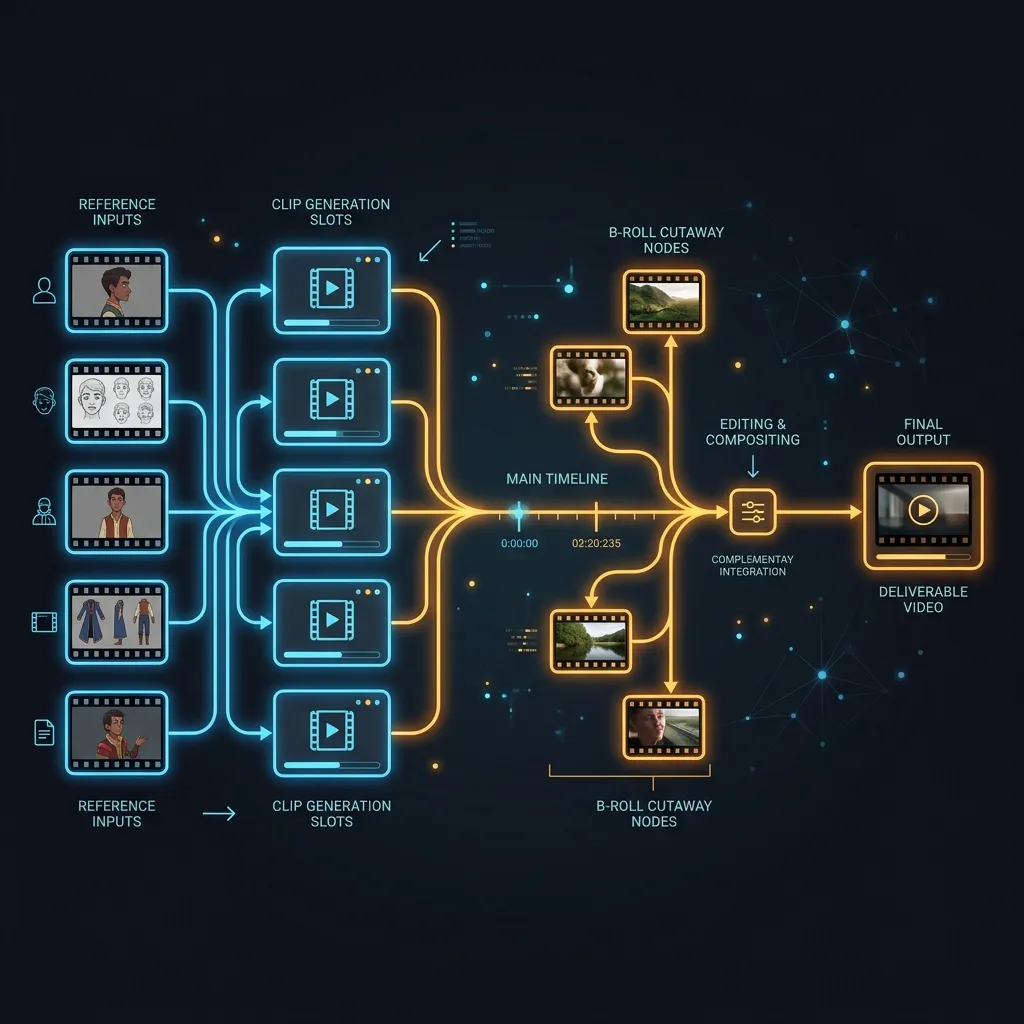
A node-based workflow treats each generation as a composable element. Instead of thinking sequentially — clip 1, then clip 2, then clip 3 — you think structurally: what does this scene need, what type of shot covers each moment, what consistency requirements does each clip have to meet, and what are the dependencies between them?
Character reference images feed into every clip where that character appears. Camera angles are selected to minimize consistency requirements (a character turning away from camera, a wide shot, a cutaway). B-roll nodes exist specifically as editorial cover. Each piece has a defined role in the sequence before a single clip is generated.
The difference in output quality between this approach and ad-hoc prompting compounds across a production. Each design decision at the workflow level reduces the problem space for every subsequent generation.
Seedance 2.0's omni reference system — where images, video clips, and audio files can each be assigned a specific role — maps directly to this kind of structured workflow. Generate your reference materials on Seedance 2.0 or start with images generated in Nano Banana 2 as reference inputs. New accounts get free credits, no credit card required.
Try it now: Seedance 2.0 | Kling 3.0 | All Video Models
The Director's Judgment Problem
There's a harder constraint underneath all the techniques, and EHuanglu named it directly: the laptop replaces the crew but not the director.
What the director does is make judgment calls. Knowing when a take is good enough. Knowing which clip version — out of the ten you generated — serves the scene. Knowing when the pacing is wrong and a cut needs to move 12 frames earlier. Knowing when the aesthetic choice is working and when it's become a crutch.
None of these are things a better model makes easier. They're the domain of the person running the production. And as ron_ecomm documented by scrolling through a working AI filmmaker's timeline from oldest to newest: the model's ceiling rises with each generation, but the creative eye doing the selection stays constant. The quality comes from the judgment applied consistently over time.
This is what skill actually means in AI filmmaking. Not knowing the best prompt keywords. Not having the fastest generation workflow. Knowing what good looks like and applying that standard to every clip you keep or discard.
The technique for developing that judgment is identical to traditional filmmaking: watch work you want to make. Identify exactly what makes it work. Apply that analysis to your own output. Repeat.
FAQ
What is the most effective post-production technique for AI video?
Color grading applied consistently across all clips is the most immediate improvement available. Raw AI video clips often have slightly inconsistent color temperatures and tonalities between generations. A unified color grade forces cohesion and makes the clips look like they were made in the same world. After color, strategic cutting — cutting on action, cutting before motion drift becomes visible — reduces the most common consistency problems.
Why does my AI video look cheap even with good prompts?
The generation ceiling for AI video models is real. Prompts can achieve good individual clips, but timing, transitions, and cross-clip consistency are problems that post-production solves better than prompting does. Speed ramping, B-roll cover at clip transitions, and color grading address the specific categories of problem that prompts can't reach.
What is the B-roll consistency mask technique in AI filmmaking?
The technique involves placing cutaway shots — hands, objects, environmental details — at moments where character consistency between clips is weakest. Instead of cutting directly from one character generation to the next (where small inconsistencies are most visible), you cut to B-roll and then cut back to the character. The viewer's visual continuity tracking resets during the cutaway, making the consistency of the return cut much less critical.
How do AI filmmakers handle character consistency across multiple clips?
The most reliable approach combines reference-based generation (consistent character inputs across all clips featuring that character) with editorial strategy (B-roll cover at transition points, style choices that reduce the visual axes on which inconsistency is detectable). Black and white removes color drift entirely. 2.5D or illustrated styles shift evaluation criteria away from photorealistic standards where consistency is hardest to maintain.
What does a node-based AI filmmaking workflow look like?
Rather than generating clips sequentially and seeing what happens, a node-based approach maps the full production structure before generating anything: character reference images, shot types per scene, B-roll requirements, and cross-clip dependencies. Each generation has a defined role before you run it. This approach reduces the problem space for each individual clip and produces more coherent sequences than ad-hoc prompting does.
The gap between AI video that looks like AI video and AI video that looks cinematic isn't about model capability. It's about what happens after generation. Color grading, strategic cuts, B-roll planning, and consistent directorial judgment applied across every clip — that's the craft layer that makes the difference. The models are already capable enough. The production discipline is what's missing.
Seedance 2.0 and Kling 3.0 on VicSee support the generation side of this workflow. New accounts get free credits, no credit card required.
Start generating: Seedance 2.0 | Kling 3.0 | All AI Video Models