The AI filmmaking highlight reel is everywhere. A creator posts a 90-second short with consistent characters, cinematic lighting, and a soundtrack that pulls the whole thing together. The replies split into two reactions: "cinema is over" and "this is just a tech demo."
Both reactions are wrong, but for different reasons.
The "cinema is over" crowd has not tried building a multi-shot sequence themselves. The "tech demo" crowd has not seen what practitioners are actually shipping. The truth sits in the middle: AI filmmaking with Seedance 2.0 works, but the workflow looks nothing like what the viral posts suggest.
Here is what the real production process looks like, based on what creators are actually building and what consistently breaks along the way.
The Films People Are Actually Making
Before diving into workflow, it helps to see what is being shipped, not just what is being demoed.
Jia Zhangke (Cannes-winning director) used AI video generation for "Dance," a short shown at the 2026 Venice Film Festival sidebar. Not a tech demo. An established filmmaker using AI as a creative tool alongside traditional production.
Dor Brothers and Logan Paul produced AI-generated content that crossed 1 million views. The production used reference images for character consistency and stitched individual clips into longer sequences. The content that reached mass audiences was not pure AI output. It was AI generation combined with editing, sound design, and pacing decisions made by humans.
Ruairi Robinson created a Tom Cruise deep fake clip that passed 1 million views. The viral moment was not the generation quality alone. It was the uncanny valley effect of familiar faces in AI-generated motion.
cryptoxiaoxiang built a 2.5D illustrated short film with Seedance 2.0 that accumulated 355,000 views. The key insight: using a 2.5D illustrated style instead of photorealism avoids the uncanny valley entirely. The model renders stylized animation better than it renders realistic human motion.
las91214 created BIRD_BINARY, an animation-to-AI rendering pipeline that hit 40,000 views. The workflow: animate traditionally, then feed the animation frames into Seedance as reference images for realistic rendering. The artist retains control of motion while the model handles textures and lighting.
The Real Workflow (Not the Demo Workflow)
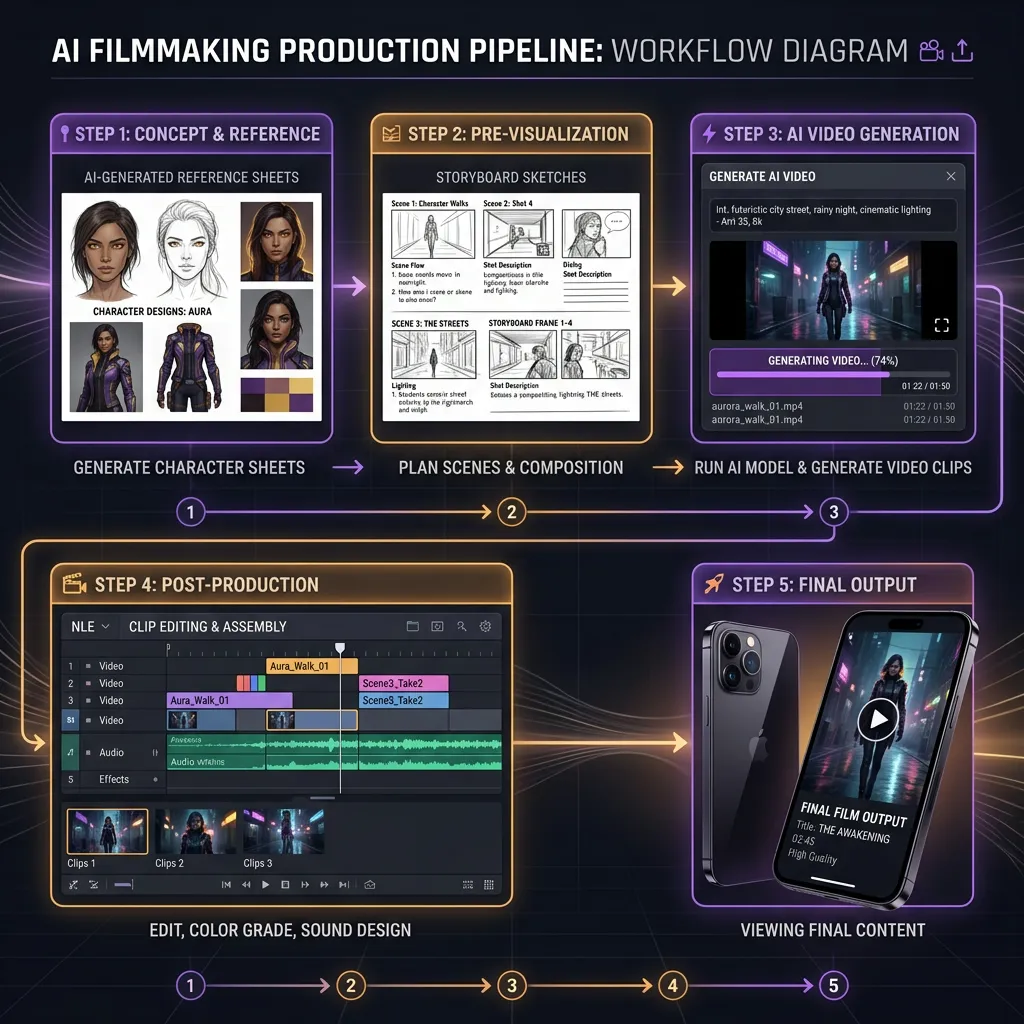
The viral demo workflow is: type a prompt, hit generate, share the clip. The real production workflow has at least five stages.
Stage 1: Reference Generation
Before you generate a single frame of video, you build your character reference library. This means generating AI portraits (since Seedance blocks real face uploads) using image generators like Seedream or Nano Banana 2.
For each character, you need:
- One strong frontal or three-quarter portrait (identity anchor)
- Optional expression variations (smile, concern, anger) if scenes require them
- Wardrobe reference if the character changes outfits across scenes
Seedance 2.0's omni reference system lets you assign each reference a specific role using @ mentions. One image controls the face. Another controls the style. A video clip controls the camera.
This stage takes longer than the actual video generation. Budget 60% of your production time here.
Stage 2: Scene Planning
AI filmmaking does not work chronologically. Several creators, including a Google DeepMind researcher who uses Seedance for personal projects, describe starting from the emotional beat rather than the opening scene.
Generate the most important moment first. The dialogue scene, the reveal, the climax. If the model cannot produce that scene convincingly, the rest of the project is wasted effort.
Then build outward: what comes before and after the key moment? This inverted approach means you are never 40 scenes deep before discovering the critical scene is impossible to generate.
Stage 3: Generation and Iteration
This is where the highlight reels lie to you.
The real success rate is roughly 1 in 3. For every usable clip, you generate two or three that fail: wrong motion, identity drift, composition issues. The real cost of a 60-second short is not $10 in API credits. It is $30 to $50 and 2 to 4 hours of generation and review.
Each generation produces 4 to 15 seconds of video at 720p. A 60-second short requires at minimum 4 to 8 usable clips, which means 12 to 24 generation attempts.
Stage 4: Post-Production (The Part Nobody Shows)
This is where AI filmmaking becomes actual filmmaking. The raw clips need:
- Color grading: Inter-clip color consistency is the most common visual problem. CoffeeVectors, who creates AI short films with talking animals, uses black and white specifically to hide color mismatches between separate generations.
- Sound design: Seedance generates ambient audio and effects but not music. Sound editing is what sells the final product, especially for non-human characters where voice acting would break immersion.
- Editing and pacing: The cut points between clips determine whether the sequence feels like a film or a slideshow. AI generates individual shots. Editing creates narrative.
- Upscaling: Native 720p is not distribution quality. Winners get upscaled to 1080p or 4K in post.
Stage 5: Distribution
CapCut integration is underrated here. Seedance 2.0 clips land directly in the CapCut editing timeline when generated through the desktop app, eliminating the export-download-import loop that slows down every cross-tool workflow.
For YouTube distribution, Google's pipeline (Nano Banana 2 references into Veo 3.1 video) has a structural advantage because everything feeds into YouTube natively. For TikTok and Instagram Reels, ByteDance's pipeline (Seedream references into Seedance video into CapCut) is the tighter loop.
What the Model Is Good At (and Bad At)
After analyzing dozens of AI short films produced with Seedance 2.0, the pattern is clear.
Where Seedance Excels
Spectacle. Battles, explosions, sweeping landscapes, dramatic reveals. These are the easiest scenes to prompt because the model has abundant training data for cinematic action, and small inconsistencies are hidden by fast motion.
Stylized animation. 2.5D illustrated styles, anime aesthetics, graphic novel looks. cryptoxiaoxiang's 355K-view short proved that stylized approaches play to the model's strengths while avoiding the uncanny valley that plagues photorealistic human generation.
Tight camera framing. Close-ups and medium shots work significantly better than wide establishing shots. When the camera is close, the model spends its compute budget on the subject's motion and expression rather than hallucinating background details. The KENPAI universe series by byarlooo uses this constraint deliberately.
Non-human characters. Creatures, robots, talking animals, stylized figures. These avoid the uncanny valley entirely because the audience has no reference for "correct" motion.
Where Seedance Struggles
Intimacy. Two-person dialogue scenes, subtle facial expressions, quiet emotional moments. As one filmmaker put it: "Models excel at spectacle, struggle with intimacy. Dialogue and subtle expressions put you straight into the uncanny valley." Intimacy is where good storytelling lives, and it is the hardest thing to generate.
Cross-shot consistency. Character faces drift across separately generated clips, even with strong references. The drift is cumulative. After 5 to 6 clips, the character has subtly evolved. This is the single biggest technical barrier to AI filmmaking today.
Hand rendering. Still unreliable across all video models, not just Seedance.
Long takes. The 15-second maximum means every shot is inherently short. Scenes that need sustained motion or dialogue beyond 15 seconds require stitching, which reintroduces consistency challenges at every cut point.
Smart Constraints That Actually Help
The most successful AI filmmakers are not fighting the model's limitations. They are building creative constraints that work with them.
Use black and white to hide color inconsistency. Color drift between clips is the most visible artifact. Black and white eliminates it entirely and adds a stylistic choice that reads as intentional.
Use sculpture or 3D renders as structure references. Pure form data, no background noise, no clothing variation, no lighting inconsistency. The model reads shape and pose without getting confused by irrelevant detail.
Keep each shot under 8 seconds. Even though the model generates up to 15 seconds, shorter clips produce more consistent results. Fast cuts also match modern viewing expectations on TikTok and YouTube Shorts.
Start with non-speaking characters. Lip sync exists in Seedance 2.0 (supports 8+ languages) but adding dialogue introduces another consistency variable. Master motion first, then add voice.
Prep references while waiting for generation. Seedance queues can be long. Use wait time to generate the next scene's character references in Seedream or Nano Banana 2.
Every model mentioned above is available through VicSee, including Seedance 2.0 omni reference and Nano Banana 2 for character sheets. New accounts get free credits, no credit card required.
Try it now: Seedance 2.0 | Nano Banana 2 | All Video Models
Try AI Filmmaking on VicSee
VicSee gives you access to the full production pipeline in one place:
- Seedance 2.0 for video generation with omni reference
- Nano Banana 2 for character reference images
- Veo 3.1 for video with native audio
- Seedream via Z-Image for stylized character references
Same account, same credits. Generate references and video from one interface instead of juggling multiple platforms.
New accounts get free credits, no credit card required.
FAQ
How much does it cost to make an AI short film with Seedance 2.0?
The real cost for a 60-second short is $30 to $50 in generation credits, not the $10 that viral demos suggest. The success rate is roughly 1 in 3 usable clips, so a 60-second film requiring 4 to 8 clips means 12 to 24 generation attempts. Budget 2 to 4 hours of production time including reference generation, iteration, and post-production.
Can Seedance 2.0 generate a full movie?
Not in a single generation. Seedance 2.0 generates 4 to 15 seconds per clip at 720p. Full sequences are built by generating individual shots and assembling them in post-production using editing software like CapCut or Premiere Pro. The longest consistent AI-generated sequences are around 90 seconds, built from 6 to 12 individual clips stitched together.
How do AI filmmakers maintain character consistency across scenes?
Through reference images and scene chaining. Each new clip uses the same character reference image anchored via the @ mention system. Some creators chain outputs by using the last clean frame from one generation as the reference for the next. The key technique is using one strong identity image rather than multiple photos, which causes the model to average facial features.
Is AI filmmaking going to replace traditional filmmaking?
No. AI handles the execution layer, generating individual shots with specific visual characteristics. Traditional filmmaking skills, story structure, editing, pacing, sound design, and performance direction, remain essential and are what separates watchable AI content from tech demos. The directors producing the best AI films (like Jia Zhangke) are experienced filmmakers using AI as one tool among many.
What style works best for AI-generated films?
Stylized and animated approaches consistently outperform photorealism. 2.5D illustrated styles, anime aesthetics, and graphic novel looks avoid the uncanny valley that makes photorealistic human motion look unsettling. Non-human characters (creatures, robots, animated figures) also perform well because audiences have no reference for "correct" motion.